MRED Blog
REinventing MLS
Let’s see how far connectMLS has come

We believe it’s our job to never stop improving the tools and resources we provide to you so that you can be successful. The market is constantly evolving; your MLS should be too!
It’s our goal to get the listing input process down to 15 minutes or less. That’s an ambitious objective, but one we think is attainable. Even more importantly, a faster, easier listing input process is a direct benefit to you, so it’s more than worth pursuing.
Here are the connectMLS improvements we’ve made in the last two months alone to help get you there:
- Implemented automatic population of photo titles.
- Implemented proactive compliance using computer vision.
- An error now shows up for anything other than “0” beds for studio or condo-loft, for better quality information.
- You can narrow subdivisions by city when searching, to limit overall choice list across the marketplace.
- Subdivisions and schools autocomplete when typing for easier selection and fewer errors.
- Schools are editable after listing input.
- Only specific data entry for dimensions field in detached and attached property types.
- Consistent case usage through connectMLS (other than remarks fields).
- Many character restrictions have been removed.
And don’t forget, we’ve also added the MRED Knowledge Base as a new 24/7 support option alongside our award-winning Help Desk. These resources are here to help you with these updates and everything else connectMLS.
We’re still not done improving, but we feel these enhancements are exciting stepping stones on the way to a better MLS experience!
Is there anything else we can be doing to make the listing input process faster? Let us know how by emailing suggestions@mredllc.com.
Questions? Contact the MRED Help Desk at 630-955-2755 or help.desk@MREDLLC.com
Remine Pro is your new public records hub

One of the most common requests we receive is to improve our public records system. We’re excited to announce we’ve found an enhanced solution.
We recently upgraded your MLS subscription to include access to Remine Pro. This gives you all of Remine’s additional features in a cutting-edge, low-downtime system which includes extensive public records data.
Remine and Realist will be available simultaneously to evaluate and adjust to the new system. We plan to shut off access to Realist beginning January 1, 2020 and want to make sure Remine covers everything you need. Explore for yourself and let us know if there are any necessary features that are not in Remine.
We’ve heard your suggestions on this change and Remine has already implemented several key features based on your feedback.
Click here for a Remine-Realist comparison
Click here for a Remine quick start guide
Here are the highlights of this enhancement:
- Realist is scheduled be removed from connectMLS on January 1, 2020.
- Remine Pro and Realist are available simultaneously until that time.
- Click here for FAQs
Here’s what you can do next:
- Email us at suggestions@mredllc.com to let us know of any features you need that are not currently in Remine.
- Beat the rush and take advantage of MRED’s free Remine training to learn more about everything this effective product has to offer:
Click here for FREE Remine training sessions
Click here to watch an in-depth webinar on Remine
Questions? Contact the MRED Help Desk at 630-955-2755 or help.desk@MREDLLC.com
The MRED Knowledge Base: Your 24/7 Support Solution Is Here!
We get it, you don’t work a job that’s just 9-5. That’s why we’re happy to provide you with an additional support solution that’s available as much as you are.
Introducing the MRED Support Center: Your one-stop shop for all questions connectMLS, rules, and beyond.
With this useful tool, you can
- Search answers to common MRED questions
- Enter support tickets
- Check the status of your support tickets
- Request new features
Click the “MRED Knowledge Base” link under “Tools, Resources, & Links” in connectMLS to access this time-saving feature.
If the answer to your question isn’t in our knowledge base (yet), you’ll be just a couple clicks away from assistance. Our award-winning Help Desk team is still here to provide any support you need.
Questions? Contact the MRED Help Desk at 630-955-2755 or help.desk@MREDLLC.com
Remine Pro: Your premium access to an easier workflow solution

Our goal is to make your job easier. Because of this, we’re excited to announce that we’ve upgraded your access to Remine from the Starter Plan to the Pro Plan as an included member benefit.
We’ve been working with Remine for a year and a half with fantastic results. During this time, Remine’s team has enacted countless updates to continually innovate and improve on their game-changing service. That’s exactly what we look for in partners to give you the tools that enable you to succeed.
Here’s what you can do with your upcoming increased Remine access:
- Find what you need with extensive property record information.
- Stay organized by tracking up to 10,000 properties (instead of just 100).
- Evaluate potential leads with access to the Buy Score.
- See when deeds and warranties are posted with enabled tracking.
- Access premium map-based search on AVMs, equity, absentee, flood, school, and neighborhoods.
- Use premium analytics within Client Engage.
Here’s what you can do next:
- Access Remine on your desktop in the “Tools, Resources, & Links” section of connectMLS and download the Remine Mobile app.
- Sign up for a FREE Remine training class to learn more about everything this effective product has to offer.
Questions? Contact the MRED Help Desk at 630-955-2755 or help.desk@MREDLLC.com
Project Upstream Updates

Here are some great resources to help keep you updated on all things Upstream:
–A letter from Upstream CEO Alex Lange about the company’s new direction
–What NAR CEO Bob Goldberg said about Upstream
–6/7/19 update on advancements with CoreLogic partnership
As time goes on and more updates are available, we’ll be updating this page with the latest news.
Clients looking for transportation options? Use MobilityScore in connectMLS!
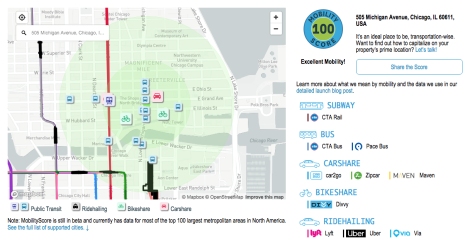
It was one of the most-requested additions for connectMLS… and now it’s live!
You can use MobilityScore by TransitScreen to help clients understand the nearby transportation options for a listing they’re interested in and choose the best fit with mobility in mind.
The MobilityScore tool displays an address’ nearby transportation options on all MRED listings, evaluating the ease of mobility on a 1-100 scale. Scores gauge public transit options as well as available carsharing, bikesharing, and hailed ridesharing services. The result is an easy-to-understand measure of transportation access that can play a major factor in home-buying decisions.
This feature is available on the connectMLS Modern View in two places:
- Additional Information
- “General” section of Listing Details
Along with the numerical score, each listing includes a rating that ranges from “minimal” to “excellent” mobility and a detailed list of its available transportation options (bus, train, carshare, etc). Just click on the MobilityScore to see the full breakdown.
MobilityScore joins a diverse list of more than 20 product and service offerings in connectMLS, contributing to MRED’s goal of providing everything you need to succeed.
Even more connectMLS enhancements are coming, and we’re always open to feedback on how to improve our current offerings. Have suggestions or questions? Contact the MRED Help Desk at 630-955-2755 or help.desk@MREDLLC.com
 MRED Blog